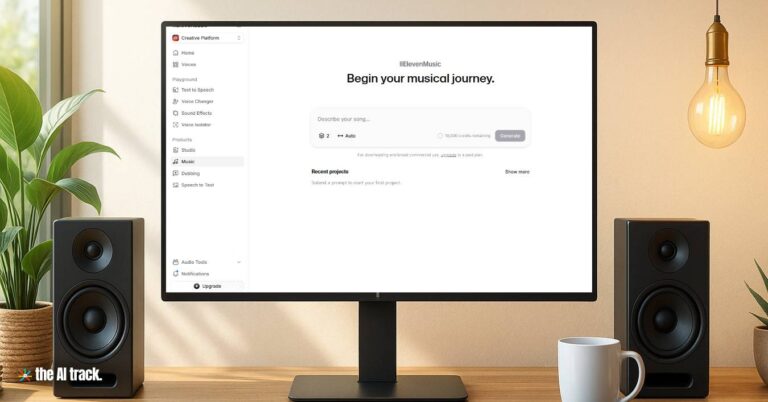
Eleven Music by ElevenLabs turns your text prompts into studio-grade songs in minutes, no musical skills required. With its high-quality audio, it’s the perfect AI music generator for beginners and semi-pros crafting soundtracks for videos, podcasts, or personal projects. From cinematic soundscapes to catchy ad jingles, it lets you control style, lyrics, BPM, and structure—then exports a polished track that’s cleared for commercial use.
Jump to Sections
TOOL ID
CATEGORY : AI Music Generator
TYPE : Online Tool
Founders: Mati Staniszewski, Piotr Dąbkowski (Founders of ElevenLabs)
Eleven Music simplifies music production, saving you hours of searching for royalty-free tracks or learning complex software. Its AI-driven approach lets you focus on creativity, producing polished songs that enhance your content’s professionalism. With legal commercial use, you can confidently use tracks in monetized projects without copyright worries. Works in multiple languages for global reach.
TOOL OVERVIEW
KEY FEATURES
- Text-to-Music Generation: Create full songs or instrumentals by typing simple prompts like “upbeat pop song with motivational lyrics.”
- Studio-Quality Audio: Outputs at 44.1 kHz for professional-grade sound rivaling human-produced tracks – benchmarked against industry standards.
- Modular song editing: Edit specific parts (e.g., verses, choruses) for precise control over structure and lyrics. Regenerate sections without starting over.
- Precise controls over key, BPM, and duration
- Built-in Lyric Editor: Tweak AI-generated lyrics or input your own for personalized tracks.
- Multilingual Support: Generate vocals in languages like English, Spanish, German, and Japanese.
- Commercial Licensing: Backed by partnerships with Merlin and Kobalt, ensuring legal use for commercial projects.
TO WHOM IS IT FOR – USE CASES
- Beginners making background music for videos.
- YouTube creators needing background music.
- Social media influencers creating catchy TikTok audio.
- Podcasters needing royalty-free intro music.
- Semi-pro creators crafting jingles for small businesses.
- App and game developers requiring ambient background tracks.
- Ad agencies producing quick campaign tracks.
- Marketers crafting audio for presentations and advertisements.
- Indie filmmakers who need an original score on a tight budget.
HOW TO USE IT
Getting started with Eleven Music is a breeze, even for complete beginners. Follow these steps:
- Sign Up: Visit ElevenLabs Music and create a free account.
- Navigate to Music: Once you’re logged in, look for the “Music” or “Sound Effects” tab in your dashboard.
- Craft Your Prompt: In the text box, describe the music you want to create. Be as specific as you can (e.g., “chill lo-fi beat for a study video”).
- Customize Settings: Choose genre, mood, duration, and whether to include vocals.
- Use the lyric editor to refine text.
- Preview & regenerate sections as needed.
- Generate: Click to create your track, which takes just a few minutes.
- Edit Sections: Use the timeline editor to tweak lyrics, reorder sections, or regenerate specific parts.
- Download: Export your track in your preferred format for use in your project.
- Use specific genre references and instrumentation in prompts: Be detailed (e.g., A melancholic and slow piano melody, with the sound of soft rain in the background, suitable for a reflective film scene, 80 bpm.”) for more accurate results.
- Use Instrument and Genre Modifiers: Experiment by combining styles. Ask for a “cinematic trap beat” or a “lo-fi bossa nova track.” You can discover unique sounds by blending unexpected genres.
- Regenerate only problem sections to save credits.
- Save Credits: Plan your generations to stay within the free tier’s 10-minute monthly limit.
- Iterate Variants: Generate multiple versions of a track to compare and pick the best one.
- Combine with ElevenLabs Voice Tools: Use ElevenLabs’ text-to-speech or voice changer for unique vocal effects in your tracks.
- For multilingual tracks, provide both language and phonetic guidance
- If integrating via API, predefine BPM and key to match existing audio assets
TOOL REVIEW
What we liked the most
- Outstanding audio quality: Tracks sound polished and professional, rivaling expensive studio productions.
- Commercial Safety: Clear licensing model with opt-in artist consent.
- Modular editing saves time and credits without starting from scratch.
- Ease of Use: The intuitive interface makes music creation accessible to anyone, no music theory needed.
- API for developers
Room for improvement
- Generic Lyrics: AI-generated lyrics can feel repetitive or lack emotional depth without heavy editing.
- UI could be more intuitive
- Credit Consumption: The free tier’s 10-minute limit may feel restrictive.
- Learning Curve for Editing: While beginner-friendly, the timeline editor can be tricky for absolute novices.
- Processing Speed: Generation can be slower compared to competitors like Suno AI.
What the Others Are Saying
- Geeky Gadgets: “Elevenlabs promises customizable lyrics, modular editing, and studio-quality audio… a compelling option for experienced musicians and producers.” Read more
- Engadget Article highlights licensing deals and early adoption by professionals
- TechCrunch Coverage details its distinction from competitors facing legal action
PRICING PLANS
What It Offers in the Free Version
- 11 Minutes of Audio: Generate up to 11 minutes of music monthly (roughly 2-3 full songs). –
- Basic Features: Access to text-to-music generation, lyric editor, and multilingual vocals.
- Download – Commercial Use: No
What Extras It Offers in the Paid Version
- Starter Plan ($5/month): 30 minutes/month of audio, commercial licensing (except streaming), and basic editing tools.
- Creator Plan ($22/month): 250 minutes/month of audio, advanced editing, and commercial licensing.
- Pro Plan ($99/month): 500 minutes/mont of audio, API access, priority processing and full commercial rights.
- Enterprise Plans: Custom pricing for high-volume use (film, TV, gaming)
Note: Prices are based on monthly billing; annual subscriptions offer discounts. Check ElevenLabs for updates.

BEST ALTERNATIVES
Suno AI
(Suno)
- Description: Suno AI generates full songs with vocals and lyrics from text prompts, excelling in user-friendly interfaces and professional-grade output.
- Better: Faster generation, advanced stem separation (up to 12 stems) and a visual timeline editor for pro-level control.
- Worse: Less focus on copyright agreements compared to Eleven Music’s industry partnerships, less granular editing.
Udio
(Udio)
- Description: Udio creates high-quality tracks with strong vocals, ideal for quick demos and genre-specific templates.
- Better: Strong arrangement tools, great for advanced composers.
- Worse: Limited editing tools and inconsistent genre accuracy compared to Eleven Music, licensing status less clear.
Mubert
(Mubert)
- Description: Mubert specializes in royalty-free background music for videos and streams, focusing on ambient and electronic genres.
- Better: Instant generation of loopable tracks for background use.
- Worse: ess customizable for precise tracks.

Frequently Asked Questions
Is Eleven Music beginner-friendly?
Yes, its simple text-prompt system lets anyone create music without prior experience.
Is Eleven Music truly royalty-free?
Yes, all tracks are cleared for commercial use under licensed datasets.
Can I use Eleven Music tracks commercially?
Yes, with paid plans (Starter and above), tracks are cleared for commercial use thanks to partnerships with Merlin and Kobalt.
How does Eleven Music compare to Suno AI?
Eleven Music offers superior audio quality and industry-backed licensing, but Suno AI has more advanced editing tools and a larger free tier.
Does Eleven Music support custom lyrics?
Yes, you can edit AI-generated lyrics or input your own using the built-in lyric editor.
Does Eleven Music support multiple languages?
Yes, you can generate lyrics and vocals in multiple languages.
Is there a free trial?
Yes, but with limited credits and watermarked exports.
Is the Eleven Music API available?
The API is in development and expected soon for integration into workflows.
Why Eleven Music Stands Out
Eleven Music by ElevenLabs is a game-changer for beginners and semi-pro creators who want to produce high-quality, royalty-free music without mastering complex software. Its studio-grade audio, customizable sections, and ethical licensing make it a top choice for 2025. While it could improve lyric originality and processing speed, its ease of use and professional output make it hard to beat. Ready to create your first track? Head to ElevenLabs Music and start composing today
This article provides an unbiased overview of each tool, informed by user reviews and expert insights, aligning with The AI Track’s commitment to offering genuinely helpful, freely accessible resources.
The Best FREE AI Tools, meticulously curated to enhance your daily activities. Every tool is tested by The AI Track team, ensuring we only present the best.

Explore six free AI music apps that transform music creation and discovery. Isolate vocals, find hidden meanings in lyrics, discover new artists, and more!

Discover Meta’s Audiobox, an innovative AI tool transforming voice and sound generation, creating realistic audio from text prompts
OpenAI launched new audio models, while rivals replicate features, signaling industry-wide race amid collapsing operational costs.