Key Takeaway
Google has released the Google Workspace CLI, a developer tool that enables AI agents such as OpenClaw to interact directly with Workspace services including Gmail, Drive, Docs, Sheets, Slides, and Calendar.
Google Workspace CLI – Key Points
The Story
Google has published the Google Workspace CLI, a command-line interface designed to connect AI agents and automation tools to Google Workspace services. Released on GitHub alongside documentation for integrating OpenClaw, the Google Workspace CLI provides a unified command interface for apps such as Gmail, Drive, Docs, Sheets, Slides, and Calendar.
Previously, developers relied on multiple APIs or workarounds to automate tasks across Workspace. With the Google Workspace CLI, Google introduces a single interface designed for both human developers and AI agents to interact with Workspace data and actions.
Google notes that the Google Workspace CLI is not yet an officially supported product and is primarily intended for developer experimentation.
The Facts
Google released the Google Workspace CLI for AI agent integration.
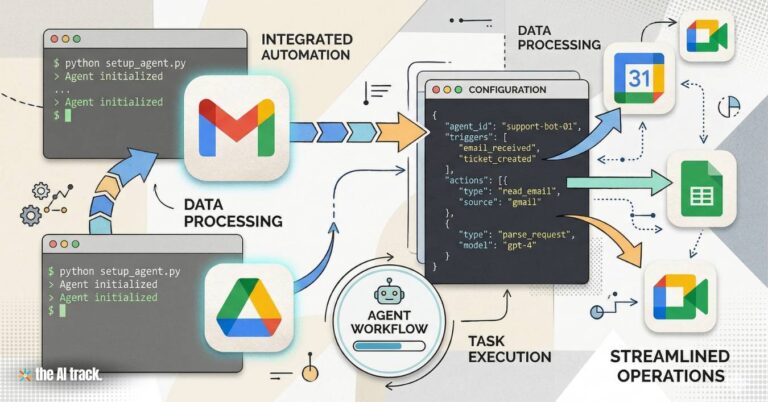
The Google Workspace CLI allows developers to connect AI assistants and automation tools directly to Workspace services through a unified programmable interface.
Developers can access Gmail, Drive, Docs, Sheets, Slides, Calendar, Chat, and other Workspace APIs from the same command-line environment.
The Google Workspace CLI ships with dozens of prebuilt helpers and recipes (reported as more than 100 agent skills in repository documentation) covering Gmail, Drive, Docs, Calendar, and Sheets tasks.
The Google Workspace CLI is open source and available on GitHub.
The repository
googleworkspace/cliis distributed under an Apache 2.0 license and can be installed usingnpm install -g @googleworkspace/cli, with binaries also available through GitHub releases.AI agents can perform real actions inside Workspace services.
Through the Google Workspace CLI, agents can list Drive files, edit documents, create spreadsheets, sort or respond to emails, and send Chat messages directly from the terminal.
The Google Workspace CLI produces structured JSON outputs for automation.
Machine-readable responses allow AI systems to run workflows programmatically instead of relying on manual integrations.
The Google Workspace CLI dynamically generates commands from Google APIs.
It reads Google’s Discovery Service at runtime so new Workspace API capabilities appear automatically without manual updates.
The Google Workspace CLI supports MCP-based integrations.
The tool includes MCP server support (
gws mcp) and extensions compatible with agent environments such as Claude Desktop, Gemini CLI, and development environments like VS Code.Documentation includes specific guidance for OpenClaw integration.
The Google Workspace CLI repository provides instructions for connecting OpenClaw, a personal AI agent framework gaining traction among developers.
The Google Workspace CLI is not yet an officially supported Google product.
The repository states the project remains under active development and may introduce breaking changes before version 1.0.
The Google Workspace CLI still requires a Google Cloud project, OAuth credentials, and Workspace permissions; it does not bypass existing governance controls.
Background / Context
Why the command line is becoming central to agentic AI
Developer tools such as Claude Code and Kilo CLI have helped establish the terminal as a control layer for AI systems that execute tasks rather than simply respond in chat interfaces. The Google Workspace CLI fits into this shift by allowing AI agents to interact with productivity tools through a programmable interface.
Why This Matters
Google Workspace is one of the most widely used productivity ecosystems for email, documents, spreadsheets, calendars, and shared files.
The Google Workspace CLI lowers the technical barrier for connecting AI agents to everyday productivity software. By exposing Workspace services through a unified command interface, the Google Workspace CLI aligns Google’s productivity platform with the emerging model of agent-driven automation across business tools.
This article was drafted with the assistance of generative AI. All facts and details were reviewed and confirmed by an editor prior to publication.

Autonomous AI Agents are moving from pilots to production. Updated 2026 analysis of Microsoft, NVIDIA, Google, Anthropic, use cases, risks, and governance.
Google rolls out Gemini 3.1 Pro with three-tier reasoning, a verified 77.1% ARC-AGI-2 score, and new demos like animated SVGs and ISS dashboards. Pricing unchanged.

ProducerAI joins Google Labs as Google expands Lyria 3 music creation in Gemini, starting with 30-second tracks and SynthID watermarking.
Google launches Nano Banana 2, officially Gemini 3.1 Flash Image, adding real-time web grounding, faster output and advanced infographic capabilities.
Read a comprehensive monthly roundup of the latest AI news!