
Claude, Gemini, and ChatGPT now make AI model migration easier, but moving chat history is only one part of switching AI models properly.
Key Takeaway
AI model migration is no longer the hard part. Claude now supports memory transfer with other AI services, Gemini offers imports from other AI platforms, and ChatGPT provides official data exports. The real challenge is preserving the working system you built around the old tool: your prompts, instructions, files, benchmarks, and quality standards.

The Story
AI model migration is easier than it used to be, but most people still do it wrong. They export their chats, test a few prompts, and assume the new tool will reproduce months of accumulated workflow habits. It usually does not. What made the old model useful was not just memory. It was the system around it: your structure, your rules, your examples, your files, and your repeated corrections.
That distinction matters more now because the major AI platforms have started building real portability features. Anthropic says Claude can transfer memory between Claude and other AI services, though it also describes the feature as experimental and still in active development. Google’s Gemini help center now includes an official “Import from other AI platforms” path. OpenAI provides official ChatGPT data exports through Settings or its Privacy Portal.
That sounds like migration. In practice, it is only partial migration. OpenAI’s export gives you a zip file with chat history and other relevant account data, but OpenAI also says that its manual workaround for moving chats between ChatGPT accounts is not a direct one-to-one recreation of your old history. If you had ten separate chats, you may end up with one uploaded conversation containing that data instead.
So the useful question is not, “Can I move my chats?” The useful question is, “Can I rebuild my best work faster in the new model?”

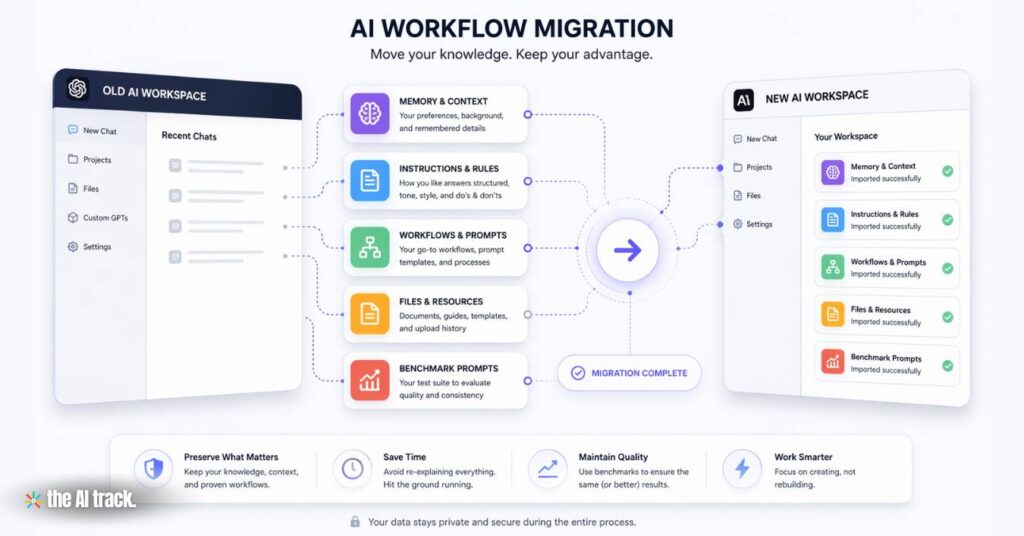
The 5 Things You Must Migrate First
1. Memory
This is the most obvious layer: preferences, personal context, recurring topics, and background details. Claude’s memory tools now let users view, edit, and transfer memory, while Gemini has formal import tools and ChatGPT supports saved memory inside its own system.
2. Instructions
This is where most migrations quietly fail. OpenAI explicitly separates memory from Custom Instructions. Memory comes from what the system has learned or saved; Custom Instructions are the direct rules you set for how answers should be written. If your tone, structure, sourcing, and formatting standards lived in instructions, moving chat history alone will not recreate them.
3. Workflows
Most serious users repeat the same jobs every week: research synthesis, drafting, editing, social content, translation, coding, or structured analysis. Those are not just prompts. They are operating patterns. If you do not rebuild those patterns intentionally, the new model may know your context but still fail at your actual tasks.
4. Assets
This includes your best prompts, strongest outputs, files, templates, style documents, checklists, and source materials. OpenAI’s Projects product makes this especially visible because files, chats, instructions, and project memory can live together in one workspace. That is why AI model migration is also a workspace problem, not just a history problem.
5. Benchmarks
You need a test suite. Otherwise you are not really doing AI model migration. You are guessing. The only reliable way to judge a switch is to compare both models on the same real tasks under the same constraints.
The Biggest Mistake People Make
The biggest mistake is treating AI model migration like a file-transfer problem.
It is not.
You are not just moving data. You are moving a working system. If you transfer only chats, the new model may know what you talked about, but it still will not know how you judge a strong answer, what structure you expect, what wording you dislike, or which recurring workflows matter most. That is why many users feel that the new model is “worse” even when its raw capability is fine. The setup did not move.
What the Official Tools Actually Help With
Claude currently offers the clearest official framing for cross-platform memory transfer. Anthropic says you can transfer memory between Claude and other AI services, and manage or edit that memory from Settings. Anthropic also states that this feature is experimental and still being developed, which is important because it sets the right expectation: useful for continuity, not a complete clone of your old setup.
Gemini is broader in one important way. Google now exposes a dedicated “Import from other AI platforms” path in Gemini Apps Help, alongside tools for imports and downloads of Gemini data. That suggests Google is treating migration as part of a larger workflow environment, not only as a chat utility.
ChatGPT gives you official export, but not a true restore. OpenAI says you can export your data from Data Controls or the Privacy Portal, receive a zip file by email, and download chat history plus other relevant account data. But OpenAI’s own transfer workaround makes clear that this is record preservation, not real reconstruction.

Discover ChatGPT’s AI emotional support for 24/7 mental well-being. Learn to cope with stress, anxiety, and life’s challenges with AI-driven therapy
The Smart AI Model Migration Workflow
Step 1: Export everything the platform officially gives you
Do this first, even if you do not plan to use the raw archive much. It is your backup layer.
For ChatGPT, export via Settings → Data Controls or the Privacy Portal. For Claude, use the privacy and memory controls in settings. For Gemini, use its import/export and Gemini-data tools in the Gemini Apps help ecosystem.
Step 2: Create one “AI Operating System” document
This is the step most people skip and the one that saves the most value.
Ask your current AI to create a structured migration brief with:
- who you are
- what you work on
- how you want answers written
- what to avoid
- your recurring workflows
- your best reusable prompts
- examples of excellent output
- common corrections you make
- what failure looks like
That document is usually far more useful than thousands of lines of old conversation.
Step 3: Rebuild your instructions manually
Do not rely on memory import alone. Memory is context. Instructions are control.
If your tone, structure, or sourcing rules are important, rewrite them directly inside the new model’s instruction layer, project setup, or equivalent customization area. OpenAI’s own documentation makes clear that Projects add a separate layer by combining chats, files, and instructions into a self-contained workspace.
Step 4: Recreate your workspaces by task
Do not rebuild your whole setup in one generic thread.
Create separate working environments for the jobs you actually do:
- writing
- research
- editing
- social content
- analysis
- coding
This matters because platform structure affects output quality. In ChatGPT Projects, for example, project memory can be project-specific, and chats can reference files and conversations within that project depending on settings and plan. That makes project design part of AI model migration, not an optional detail.
Step 5: Run a benchmark week
Use the new model for real work for seven days and score it on:
- output quality
- revision burden
- factual discipline
- instruction-following
- consistency
- usefulness under long context
- speed to a usable first draft
Then decide whether the result is:
- a full switch
- a partial switch
- a dual-model setup
That is AI model migration with evidence instead of migration by mood.

Learn how to easily integrate 10 uses of artificial intelligence into your daily life, using free and user-friendly AI tools, with this starter guide
The Prompts That Actually Help
Prompt 1: Extract my AI operating system
I am migrating to another AI assistant. I do not want a vague summary. I want a reusable operating document.

Return these sections exactly:

1. Identity and ongoing context
2. Professional goals and recurring projects
3. Response preferences
4. Formatting rules
5. Tone and voice preferences
6. Things I repeatedly ask you to avoid
7. My strongest recurring use cases
8. My common corrections to your behavior
9. My best reusable prompt patterns
10. What excellent output looks like for me
11. Important background facts that affect future answers
12. Uncertainties or weak assumptions you still have about my preferences

Be specific. Preserve my wording when possible. Do not collapse distinct preferences into vague summaries.
Prompt 2: Turn my preferences into instructions
Convert everything you know about how I work into a clean instruction set for another AI.

Split it into:
- Voice
- Formatting
- Research behavior
- Sourcing rules
- Workflow behavior
- What to avoid
- Default assumptions
- Non-negotiable rules

Write it as instructions, not commentary.
Prompt 3: Extract my real workflows
Identify the main workflows I use you for.

For each workflow, return:
- Workflow name
- Goal
- Typical input
- Typical output
- My success criteria
- Common failure modes
- A reusable starter prompt
- A stricter expert version
Prompt 4: Build a benchmark suite
Create a benchmark suite of 10 prompts that reflect my real work.

The suite should test:
- writing quality
- summarization
- factual discipline
- instruction-following
- long-context handling
- revision quality
- structured editing
- creativity under constraints
- research usefulness
- consistency

For each test, define:
- what a strong answer must include
- what failure looks like
- what should be easy to compare across models
Prompt 5: Onboard the new model properly
I am migrating from another AI assistant. Study the attached migration brief carefully.

Do three things:

1. Summarize the highest-priority rules you must follow.
2. Identify the main gaps or ambiguities that would reduce output quality.
3. Create an onboarding plan that includes:
- a default instruction set
- a recommended workspace structure
- an evaluation checklist for your own outputs
- the 7 most useful questions you need answered to match or exceed my old setup

Do not flatter the brief. Operationalize it.

This ultimate collection of tried and tested prompts will help you unlock maximum productivity from ChatGPT and AI bots for common tasks.
The Most Useful Tricks
- Save your corrections, not just your preferences. The best signal is often not what you asked for once. It is what you corrected ten times.
- Save three gold-standard outputs. A new model often learns your quality bar faster from a few excellent examples than from a long abstract description.
- Separate rules from source material. OpenAI’s GPT framework reflects this logic directly: instructions govern behavior, while knowledge files provide reference material. Even outside GPT building, that is the right mental model for AI model migration.
- Do not force total migration. In many real setups, the best answer is not one model replacing another. It is one model for writing, another for research, another for coding, and another for speed.
Bottom Line
AI model migration is getting easier at the platform level. Claude now supports memory transfer with other AI services, Gemini has formal imports from other AI platforms, and ChatGPT offers official exports of chat history and account data. But the users who switch well are not the ones who move the most archive data. They are the ones who deliberately migrate their prompts, instructions, workflows, files, and benchmark tests.
That is the real AI model migration path.
Not “move my chats.”
Move my advantage.

Autonomous AI Agents are moving from pilots to production. Updated 2026 analysis of Microsoft, NVIDIA, Google, Anthropic, use cases, risks, and governance.