Key Takeaway
Adobe integrates lightweight versions of Photoshop, Acrobat, and Adobe Express directly into ChatGPT, enabling users to design, edit images, and modify PDFs through natural-language instructions without switching applications, bringing Adobe’s core creative tools to ChatGPT’s roughly 800 million weekly users.
Adobe Integrates Apps Inside ChatGPT – Key Points
Native Adobe apps launch inside ChatGPT (December 2025)
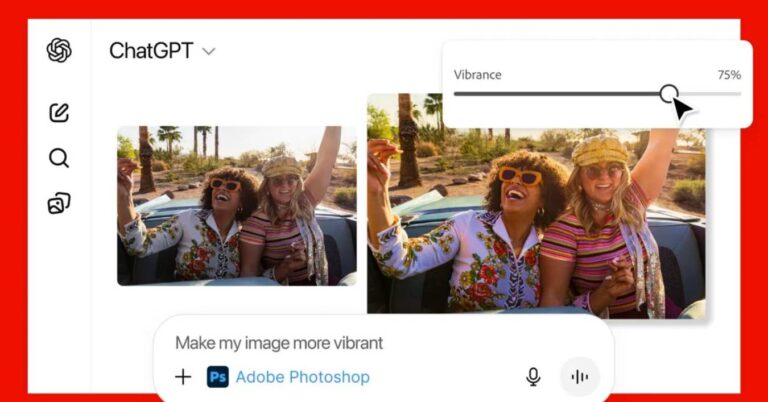
Adobe integrates Adobe Photoshop, Adobe Acrobat, and Adobe Express inside ChatGPT as of December 10, 2025, per an Adobe corporate release from San Jose, California. Users activate an app by typing its name followed by an instruction (for example, “Adobe Photoshop, help me blur the background of this image”) alongside an uploaded file. Once activated, the app stays active throughout the conversation without needing to be re-invoked.
Free global availability across platforms
Photoshop, Adobe Express, and Acrobat for ChatGPT are free for ChatGPT users worldwide and are available on desktop, web, and iOS. Adobe Express is also available on Android, with Photoshop and Acrobat support for Android scheduled to follow. This removes cost and installation barriers for casual users and first-time Adobe customers.
Conversational controls combined with familiar Adobe UI elements
Adobe apps inside ChatGPT combine text-based instructions with optional manual controls. Depending on the task, users may receive multiple suggested results or access familiar interface elements such as Photoshop sliders for brightness, contrast, and exposure. This hybrid model supports both quick edits and more deliberate adjustments without leaving the chat.
Photoshop in ChatGPT focuses on high-quality, targeted image edits
Photoshop inside ChatGPT supports editing specific parts of an image, fine-tuning brightness, contrast, and exposure, and applying creative effects such as Glitch and Glow, while preserving image quality. The feature set is intentionally narrower than the desktop application, positioning it as a fast entry point rather than a full professional replacement.
Acrobat expands document and PDF workflows in-chat
Adobe Acrobat inside ChatGPT allows users to edit PDFs, extract text or tables, merge multiple files, compress documents, convert files into PDF format, and redact sensitive information. These actions can be performed by selecting specific sections or by describing the desired changes in plain language, while maintaining document formatting and quality.
Adobe Express enables end-to-end design creation inside ChatGPT
Adobe Express allows users to generate and edit designs such as posters, invitations, and social media graphics entirely within ChatGPT. Users can browse Adobe Express’s professional template library, replace text and images, adjust colors, animate elements, and iterate on designs without switching apps.
Built on Adobe’s agentic AI and Model Context Protocol
Adobe integrates apps directly into ChatGPT as part of its broader strategy around agentic AI and the Model Context Protocol (MCP). This launch follows earlier 2025 announcements including Acrobat Studio, AI Assistants for Photoshop and Adobe Express unveiled at Adobe MAX, and a preview of an upcoming Adobe Firefly AI Assistant designed to work across multiple Adobe apps.
Seamless handoff to full Adobe desktop applications
For users who need advanced controls, projects started inside ChatGPT (images, PDFs, or designs) can be opened directly in Adobe’s native applications. Work continues from the same state, enabling a smooth transition from conversational editing to full professional workflows.
Why This Matters
Adobe integrates its most popular creative and productivity tools directly into ChatGPT, significantly lowering the barrier to entry for image editing, design, and document work. The move positions conversational AI as a primary interface for creative tasks, expands Adobe’s reach to hundreds of millions of users, and signals a broader shift toward AI-first workflows where professional tools meet users inside platforms they already use daily.
This article was drafted with the assistance of generative AI. All facts and details were reviewed and confirmed by an editor prior to publication.
See which AI image generator is the best in this epic showdown among the top 12 and discover which one can create the most realistic, creative, or surreal images
Explore 50+ viral ChatGPT 4o image prompts—from memes to comic strips to pet makeovers. Try them now and unleash your visual creativity.
Read a comprehensive monthly roundup of the latest AI news!